The best laptop for architecture in 2026
We compared MercadoLibre's best-selling laptops and picked the ones that actually run Revit, AutoCAD and 3D models without crawling.
Prices verified on August 6, 2026 · How we do it
How we chose: We analyzed 13 real products on the market · MercadoLibre Argentina
As an affiliate, CompraGuide may earn a commission from qualifying purchases. It costs you nothing extra.
Quick verdict
For most people, the Acer Aspire Go 15 with 32 GB of RAM is the best buy: plenty of memory for large models, and it's on sale. Want the lowest price? The refurbished HP EliteBook. Want the most power? The Lenovo IdeaPad Slim 3.
What to look for before buying
- RAM: 16 GB minimum, 32 GB for 3D — Revit, AutoCAD and SketchUp with large models eat memory; with 8 GB you'll struggle.
- An 8-core CPU — Moving heavy models and rendering scales with cores: aim for a Ryzen 7 or Core i7.
- A 512 GB SSD or larger — Projects, textures and families take up space; an NVMe SSD also speeds everything up.
- A large, sharp screen (Full HD or better) — You'll stare at thin lines all day: 15 to 16 inches at a good resolution strains your eyes less.
- A dedicated GPU only if you render in 3D — For 2D and light modeling, integrated graphics are enough; for V-Ray or Lumion a dedicated GPU helps, and it's rare in this price range.
- Battery and weight, if you go to site — If you visit sites often, prioritize 1.6 to 1.8 kg and 6 or more real hours of battery.
Our recommendations
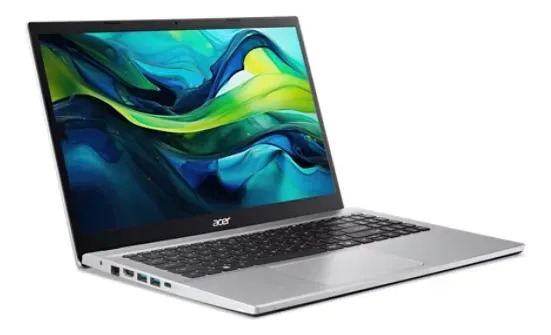
Acer Aspire Go 15 · Ryzen 7 7730U · 32 GB RAM · 512 GB SSD
An 8-core Ryzen 7 7730U, 32 GB of RAM and a 512 GB SSD. That much memory is exactly what pays off with 3D models and many drawings open at once.
Create price alert
Leave it empty to be alerted on any drop.

Lenovo IdeaPad Slim 3 · Ryzen 7 7735HS · 16 GB DDR5 · 1 TB SSD
The most powerful processor of the bunch (Ryzen 7 7735HS, 45 W), 16 GB DDR5, a 1 TB SSD and a 15.3" WUXGA IPS screen. Power and room to spare for large projects.
Create price alert
Leave it empty to be alerted on any drop.
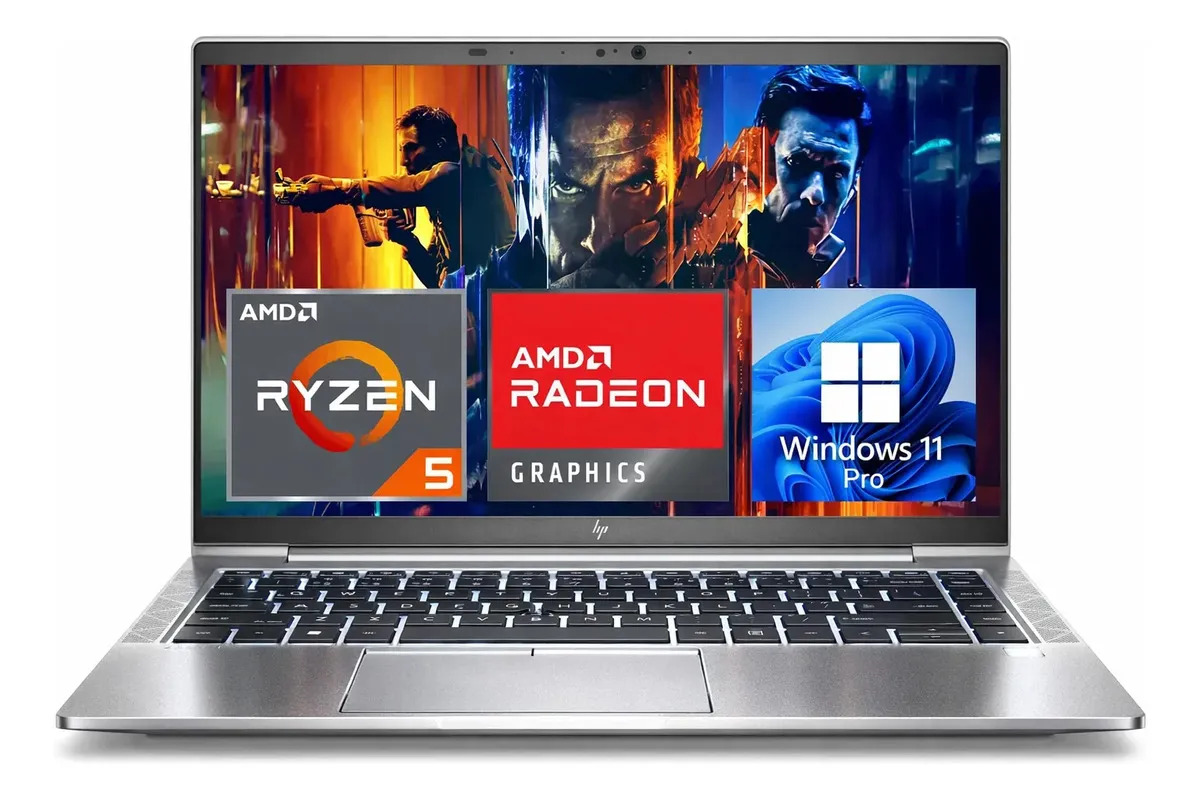
HP EliteBook 845 G8 · Ryzen 5 Pro · 16 GB · 256 GB (refurbished)
Refurbished and business-grade: Ryzen 5 Pro, 16 GB of RAM and a 256 GB SSD for less than half. Great to get started without overspending (check the seller's warranty).
Create price alert
Leave it empty to be alerted on any drop.

HP OmniBook 5 · Ryzen AI 7 · 16 GB DDR5 · 16" 2K
A latest-generation Ryzen AI 7 chip, 16 GB DDR5 and a 16-inch 2K screen: the best surface to draw in detail for hours.
Create price alert
Leave it empty to be alerted on any drop.
Side-by-side comparison
| Product | Price | Installments | Rating | Where |
|---|---|---|---|---|
| Acer Aspire Go 15 · Ryzen 7 7730U · 32 GB RAM · 512 GB SSD | $ 1.358.999 | 12 | — | MercadoLibre |
| Lenovo IdeaPad Slim 3 · Ryzen 7 7735HS · 16 GB DDR5 · 1 TB SSD | $ 1.743.574 | 12 | — | MercadoLibre |
| HP EliteBook 845 G8 · Ryzen 5 Pro · 16 GB · 256 GB (refurbished) | $ 474.227 | 12 | — | MercadoLibre |
| HP OmniBook 5 · Ryzen AI 7 · 16 GB DDR5 · 16" 2K | $ 1.399.000 | 12 | — | MercadoLibre |
Choosing a laptop for architecture isn’t about buying the most expensive one: it’s about finding the balance between memory, power and screen so it moves your drawings and models without crawling. We analyzed the best-selling laptops on MercadoLibre Argentina and kept the ones that genuinely hold up.
What does an architecture laptop actually need?
The software you use —AutoCAD, Revit, SketchUp, ArchiCAD— mostly demands RAM and a multi-core processor. The graphics card matters when you get into 3D rendering (V-Ray, Lumion, Twinmotion); for everything else, a modern integrated GPU does the job.
Our pick for most people
The Acer Aspire Go 15 takes first place for a simple reason: 32 GB of RAM in this price range is a luxury, and it’s exactly what you’ll appreciate with large BIM models and several programs open. On top of that, it’s heavily discounted.
If your priority is spending as little as possible, the refurbished HP EliteBook 845 G8 gives you 16 GB and business-grade quality for less than half. And if you want the most raw power —a 45 W CPU and a 1 TB drive—, the Lenovo IdeaPad Slim 3 is the most capable of the lot.
Special mention: the screen
If you spend hours staring at thin lines, the HP OmniBook 5 has a 16-inch 2K display that makes a difference: more drawing space and everything sharper.
Based on your case
If you mostly work in 2D (AutoCAD) on a tight budget
If your day is more 2D drafting in AutoCAD and light modeling than heavy rendering, you don’t need to spend a fortune: 16 GB of RAM, a Ryzen 5 or 7 and an SSD are plenty. The refurbished HP EliteBook 845 G8 gives you exactly that for less than half. Save the budget to add RAM later if you need it.
For 3D modeling and BIM (Revit, SketchUp)
Here RAM rules: large BIM models and many open drawings eat memory. 32 GB is what you notice most, which is why the Acer Aspire Go 15 (32 GB in this price range) is our overall pick. If you also render in V-Ray or Lumion, you’ll want a dedicated GPU, uncommon in this range: it’s a step up in category and price.
For architecture students
At university, prioritize balance and portability: 16 GB minimum, an SSD, a sharp screen and light weight to carry to class. The refurbished EliteBook is the cheapest way to start; if you want headroom for the 3D years ahead, the Acer with 32 GB lasts your whole degree.
What about a MacBook?
The best-selling 13-inch MacBook comes with 8 GB of RAM, not enough for heavy 3D. That’s why we kept it off the podium: we’d rather be honest than recommend by brand.
Frequently asked
Can a laptop with integrated graphics handle architecture?
For 2D drafting (AutoCAD), modeling in Revit or SketchUp and light massing, yes. For heavy 3D rendering (V-Ray, Lumion, Twinmotion) you'll want a dedicated GPU, uncommon in this guide's price range.
How much RAM do I really need?
16 GB is the comfortable minimum. If you work with large BIM models or many programs at once, 32 GB makes a huge difference and is what you'll notice most day to day.
Is a refurbished laptop worth it?
It can be great value, especially in business lines like the EliteBook. Check that it has a seller warranty and good reputation; the savings are usually 40 to 50 percent.
Mac or Windows for architecture?
Most software (Revit, AutoCAD, 3ds Max) runs natively on Windows. On Mac there are options (ArchiCAD, Vectorworks) but watch the RAM: 8 GB isn't enough for 3D. That's why we left the best-selling 13-inch MacBook off the podium.
Which laptop is enough if I mostly work in 2D with AutoCAD?
For 2D drafting and light modeling you don't need to spend a fortune: 16 GB of RAM, a Ryzen 5 or 7 and an SSD are plenty. A good-value option is the refurbished HP EliteBook 845 G8, which gives you that for less than half.
I'm on a tight budget — what shouldn't I cut?
Don't cut RAM or the SSD: 16 GB and a solid-state drive are what keep the machine from crawling. You can give up a dedicated GPU (if you don't render heavy 3D) and buy refurbished in business lines like the EliteBook, where the savings are 40 to 50 percent without losing quality.
Which laptop suits an architecture student?
Look for balance and portability: 16 GB minimum, an SSD, a sharp screen and light weight for class. The refurbished EliteBook is the cheapest to start; if you want headroom for the 3D years ahead, the Acer with 32 GB lasts your whole degree.
Are prices and stock up to date?
Yes: we pull real price and availability from MercadoLibre. They can change at any time; the link always takes you to the current offer.
Before you choose, read this
Related guides

Still unsure? Tell the assistant what you need and it'll recommend based on your budget.
Ask the assistant →